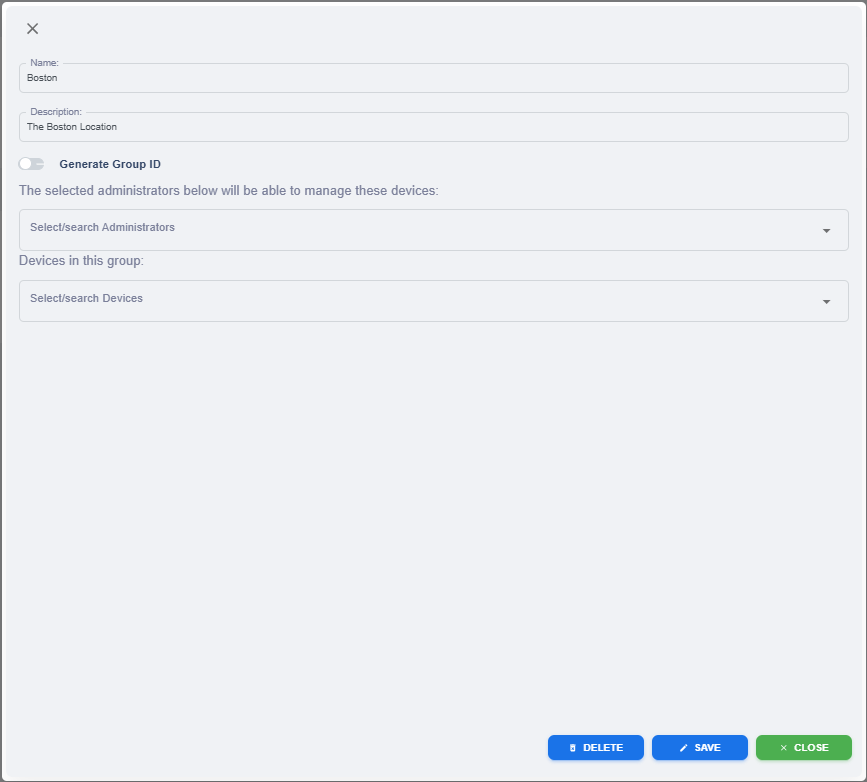
KRMC Hosted - Admin Management Page - Groups - Edit Group Information

Super Administrators (SA) and Regular Administrators (RA) with access can change a Group’s information by clicking the Edit Group Information button.
Edit Group Information change modify the following:
| Name | The name of the group that is displayed both on the groups page but as well on the Device List. |
| Description | The description of the group. This is not visible anywhere except for Group Edit Information. |
| Generate Group ID | If your group does not already have a Group ID generated, you can enable this option and select Save. This will automatically generate a Group ID for this group. If your group already has a Group ID, this option will not be able to be toggled. Note: Group IDs are not able to be deleted after being generated. |
| Select/Search Administrators | You are able to select as many or as few RA accounts you would like to manage these drives. If no RA is selected, the drives in this group will only be able to managed by the SA or by an RA with the Advanced Account Ability of "Can See All Drives". For more information on Advanced Account Abilities, please click HERE. |
| Select/Search Administrators | This allows you to select which drives are in your group. Note: Drives are only allowed to be in one group. |
| Save | Saves all changes made within this menu. |
| Delete | Deletes the group from KRMC Hosted. Note: Deleted groups cannot be retrieved after deleted. |
| Close | The window closes. |