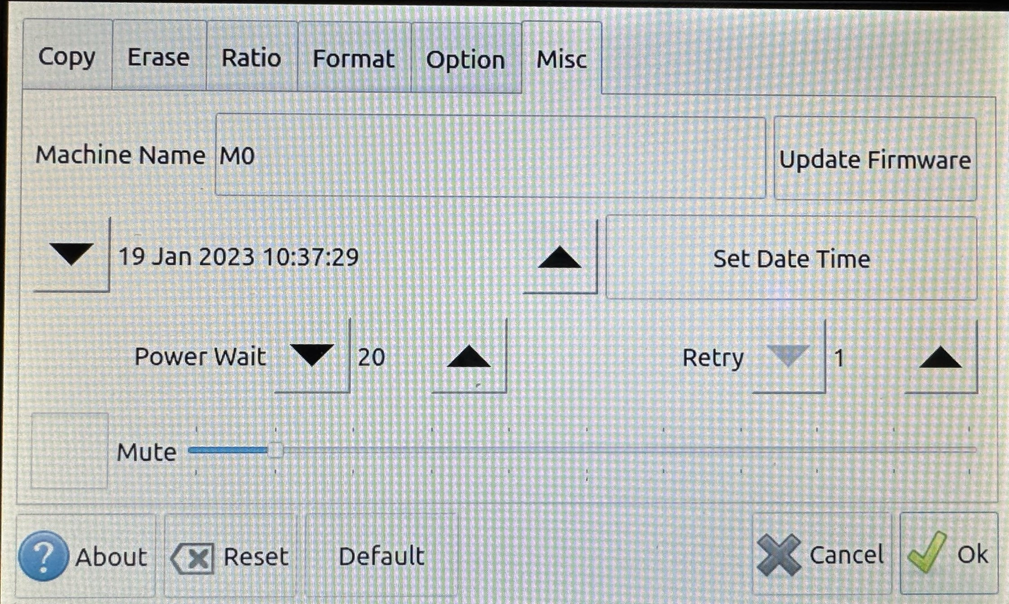
11-Target NVMe Duplicator - Settings - Misc

Misc Settings allow you to alter system-based settings. These settings do not alter operations with the drives but rather base settings.
|
Machine Name |
Give your duplicator a unique name. |
|
|
Update Firmware |
Update your duplicator’s firmware to the latest version. Please contact iStorage Kanguru Technical Support to check if there is a newer firmware version for your duplicator. |
|
|
Set Date Time |
Set the system date and time. This information is useful when saving log files. |
|
|
Power Wait |
Set the amount of time the system waits between powering on the connected drives and executing a function. Setting this too low may cause some drives to be not recognized by the duplicator before a function begins. |
|
|
Retry |
Set the number of times that the duplicator retries sending general error handling commands when it encounters an error before failing. |
|
|
Volume |
Slider |
Move the slider position left/right to adjust the system volume. |
|
Mute |
Select Mute to stop all system sounds. |
|