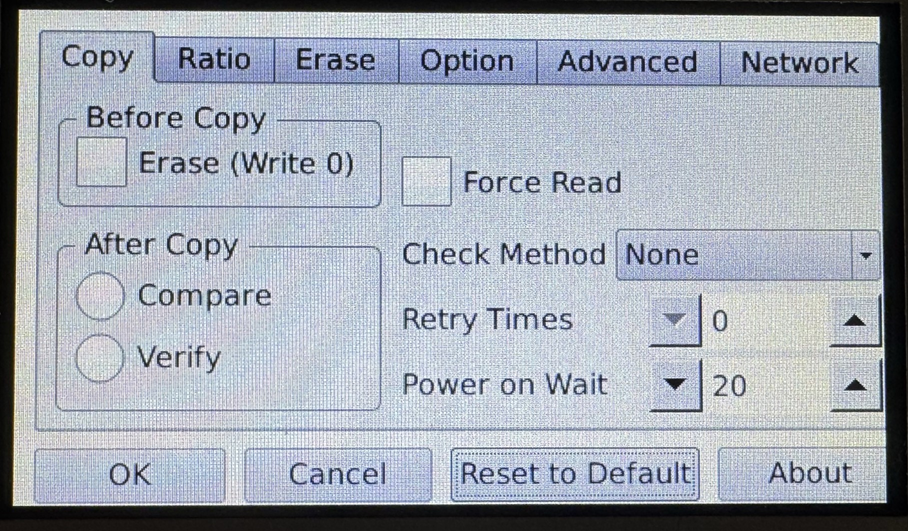
4-Target NVMe Duplicator - Setting - Copy

The Copy options provides the ability to set options to perform before the copy process starts as well after the copy process completes. Additionally, you are able to multiple other functions such as:
|
Before Copy |
Operations that are performed prior to performing any copy process. |
|
|
Erase (Write 0) |
When enabled, all target drives have a quick erase performed before any copy process starts. If the erase process fails on any target, that failed drive will not have a copy process performed on it. Note: This is the Default setting. |
|
|
After Copy |
Operations that are performed after performing any copy process. |
|
|
Compare |
After any Copy completes, automatically compare the data on the Source to the Targets. Note: This is the Default setting. |
|
|
Verify |
After any Copy completes, automatically verify that the Target drives are readable. Note: This is the Default setting. |
|
|
Force Read |
Enable or disable error skipping during any copy. |
|
|
Enabled |
The duplicator will automatically skip any bad sectors encountered when reading the Source and write a zero in its place on the Target. |
|
|
Disabled |
The duplicator will cancel the current process when an error is detected. Note: This is the Default setting. |
|
|
Check Method |
Configure whether the system checks for a matching CRC32 between the Source and Target drives. When enabled, the duplicator will automatically check the hash of the Source against the Target drives after a copy completes. The Default setting is set to None. To enable this, select Fast Checksum. |
|
|
Retry Times |
Configure the number of times that the duplicator retries sending general error handling commands when it encounters an error before failing. You can select any option between 0 to 5. The default setting is 0. |
|
|
Power on Wait |
Configure the number of seconds that the duplicator takes to verify that a drive is connected to each port. Verifying if a drive is connected to each port is completed by waiting for acknowledgment from the moment the port receives until the Power on Wait time expires. The setting can be set between 0 and 100. The default setting is 20. |
|