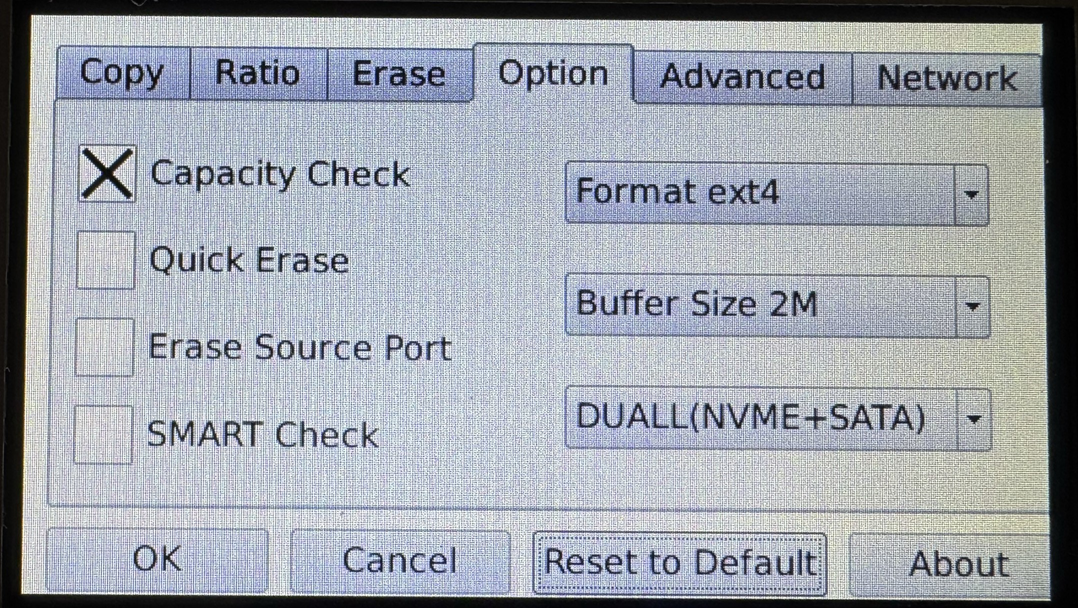
4-Target NVMe Duplicator - Setting - Option

Options Settings allow you to alter operation-based settings. These settings alter its operations with drives not the system-based settings.
|
Capacity Check |
Check that the capacity of Target drives is at least equal to or larger in capacity as the Source drive. Enabled by default. |
|
|
Quick Erase |
Zero the partition table on Target drives. Disabled by default. If Quick Erase is enabled in the Option menu, it will force-lock the CUSTOM erase function, allowing only Quick Erase to be executed. |
|
|
Erase Source Port |
Allow the drive connected at the Source position to be erased. Note: This is the Default setting. |
|
|
SMART Check |
Self-Monitoring, Analysis and Reporting Technology monitors drive indicators of reliability and is often able to anticipate future failures. SMART checks the electrical and mechanical performance as well as the read performance of the disk. Electrical tests can include a test of cache, a read/write circuitry test, or a test of the read/write head elements. Mechanical tests include seeking and servo on data tracks. Note: This is the Default setting. |
|
|
Format |
You are able to format the m.2 SATA and NVMe drives connected to the device in either ext4, ntfs, or fat file system. Note: This will also format the drive connected to the Source Port. |
|
|
Buffer Size |
Buffer Size refers to the amount of data moved in a single operation when an ATA command is issued. In certain situations, adjusting the data transfer length may help resolve some compatibility issues. By default this is set to 2M however it can be set to 64K, 128K, 1M, 2M, or 16M. |
|
|
Drive Compatibility |
Drive Compatibility allows the ability to alter what types of drives are able to be used with the duplicator. |
|
|
DUALL (NVME + SATA) |
Both NVMe and M.2 SATA drives are able to be used with the device. |
|
|
DUALL (NVME) |
Only NVMe drives are able to be used with the device. |
|
|
DUALL (SATA) |
Only M.2 SATA drives are able to be used with the device. |
|