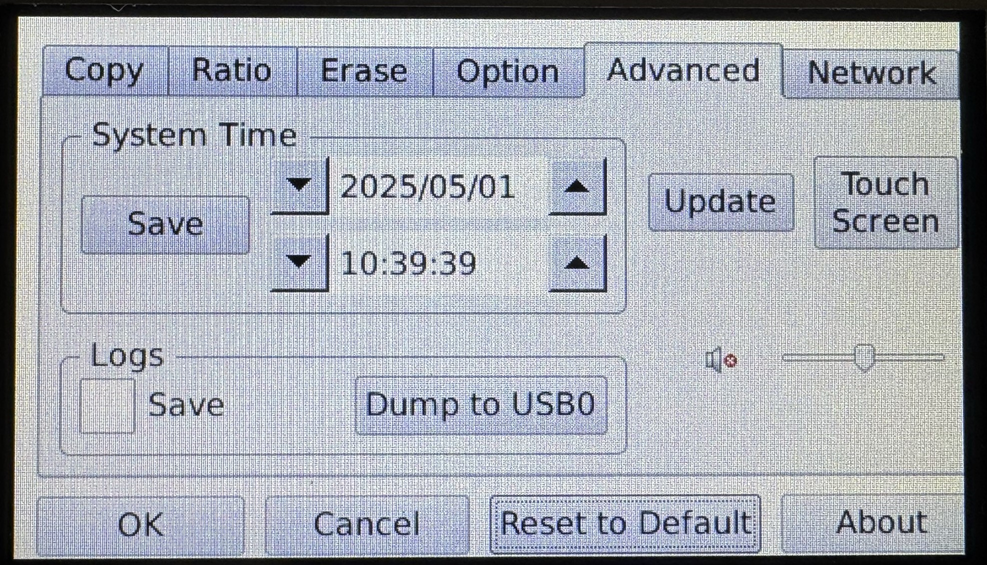
4-Target NVMe Duplicator - Setting - Advanced

Advanced Settings allow you to alter system-based settings. These settings do not alter operations with the drives but rather base settings.
|
System Time |
Set the current date and time and then tap the Save button. |
|
|
Logs |
Save |
Enable to allow system logs to be saved in the duplicator’s flash memory. |
|
Dump to USB0 |
Tap to save the system logs to a USB flash drive connected to the duplicator’s USB port. |
|
|
Update |
Update the firmware on your duplicator. |
|
|
Touch Screen |
Tap to adjust touch screen calibration. For more information, refer to Calibrating the Touchscreen. |
|
|
Volume |
Slider |
The slider provides the ability to alter the volume of the duplicator sounds. |
|
Mute |
Turn the duplicator sound on and off. |
|