
HD Pro Duplicator - Control Manager Software - Viewing Log Information - Quick View

The Quick View displays much of the same information as the Control Center view, but organizes the information into a spreadsheet format. Quick View provides more comprehensive information regarding the drives and the operation.
You can filter the Quick View list for specific information by configuring the filters located at the top of the Quick View window.
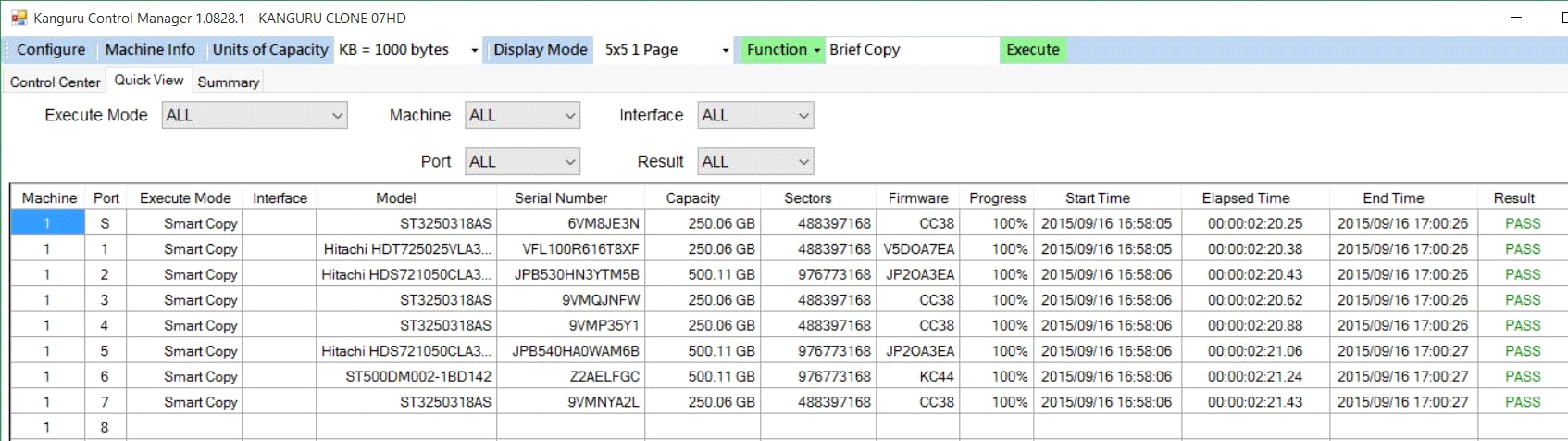
In addition to the information that is shown in the Control Center view Quick View also displays:
- Both storage capacity and the number of sectors on the drive
- The operation progress
- The operation start time
- The operation elapsed time
- The operation end time
Note: The ‘Progress’ indicator will not display the actual progress in real-time, unless the ‘Real Time Message’ option is enabled on the duplicator. If the ‘Real Time Message’ option is disable on the duplicator, then progress will only be shown as 100% when the operation is completed. Please refer to your duplicator’s user manual for more information about enabling/disabling the ‘Real Time Message’ option.
Note: The operation starts and end times are based off the time on your computer.


