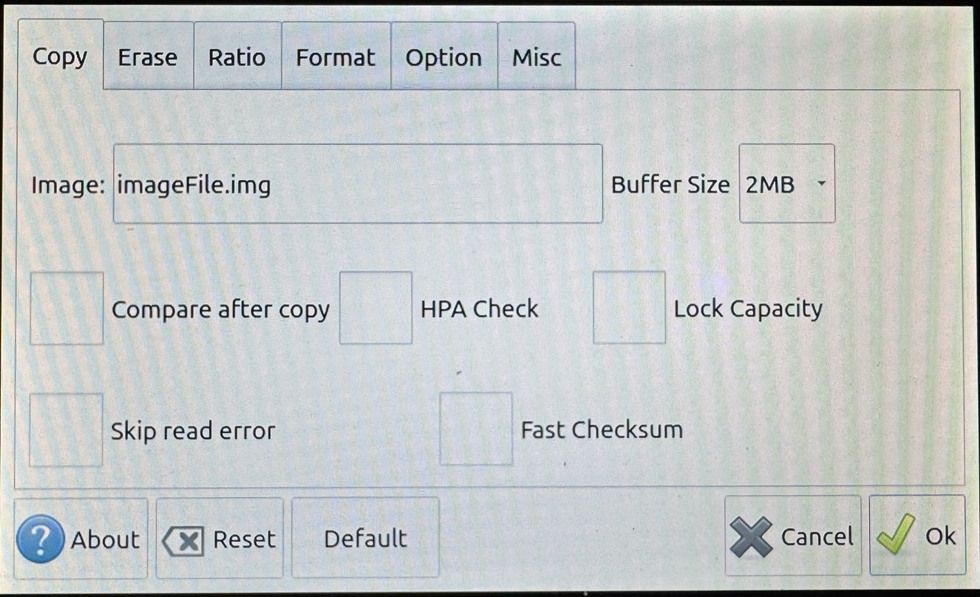
11-Target NVMe Duplicator - Settings - Copy

The Copy options provides the ability to set options to perform before the copy process starts as well after the copy process completes. Additionally, you are able to multiple other functions such as:
|
Image |
Enter a file name for saved image files. This is utilized as a default name for the storage center feature (Load) and you are able to alter this during the Load process. |
|
|
Buffer Size |
Buffer Size refers to the amount of data moved in a single operation when an ATA command is issued. In certain situations, adjusting the data transfer length may help resolve some compatibility issues. By default this is set to 2M however it can be set to 64K, 128K, 1M, 2M, or 16M. |
|
|
Compare after copy |
After a Copy completes, the duplicator will automatically compare the data on the Source to the Targets. |
|
|
Disabled |
The system will not perform a compare process after a Copy process completes. Note: This is the Default setting. |
|
|
Enabled |
The system will perform a compare process after a Copy process completes. |
|
|
HPA Check |
The Host Protected Area (HPA), sometimes referred to as the Hidden Protected Area, is a partition on the hard drive that is not normally visible to an operating system. |
|
|
Disabled |
The system will not check for HPA partitions. Drives that contain HPA may not duplicate successfully. Note: This is the Default setting. |
|
|
Enabled |
When HPA CHECK is enabled the duplicator will support Host Protection Areas. When you duplicate a Source HDD that contains HPA, the system will detect the HPA partition, unlock it, copy the area and then re-lock the area once duplication is complete. |
|
|
Lock Capacity |
Lock Capacity keeps a larger capacity target drive(s) at the same capacity as the source drive. |
|
|
Disabled |
When disabled, if a target drive has a larger capacity, then the source drive, the target drive will maintain its original capacity. For example, if the source drive is 1TB and the target drive is 2TB, after the duplication process is completed, the target drive's capacity will still be at 2TB. Note: This is the Default setting. |
|
|
Enabled |
When enabled, Lock Capacity determines the locked capacity of the target drive based on the source drive's capacity. For example, if the source drive is 1TB and the target drive is 2TB, after the duplication process is completed, the machine will lock the target drive's capacity to 1TB. |
|
|
Skip read error |
Enable or disable error skipping during any copy. |
|
|
Disabled |
The duplicator will cancel the current process when an error is detected. Note: This is the Default setting. |
|
|
Enabled |
The duplicator will automatically skip any bad sectors encountered when reading the Source and write a zero in its place on the Target. |
|
|
Fast Checksum |
Configure whether the system checks for a matching CRC32 between the Source and Target drives. |
|
|
Disabled |
When disabled, the duplicator will not check the hash of the Source against the Target drives after a copy completes. Note: This is the Default setting. |
|
|
Enabled |
When enabled, the duplicator will automatically check the hash of the Source against the Target drives after a copy completes. |
|