
4-Target NVMe Duplicator - General Operation

All operation of the KanguruClone 4 NVMe is done using the touch-screen display. Once the duplicator boots up, you see the Main Menu screen.
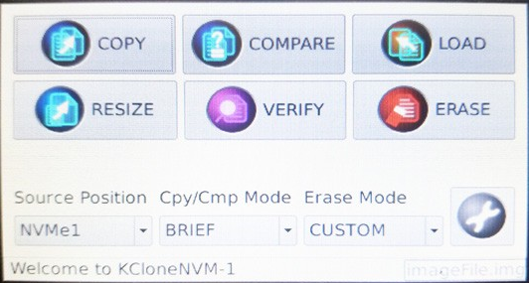
All the main functions and configurations can be accessed through the Main Menu.
|
Copy the data from the drive connected to the Source Position to all other drives. |
||
|
Resize Copy is used specifically when copying drives that are of different capacities. |
||
|
Compare data on the drive connected to the Source Position to all other drives. |
||
|
Verifies that all connected drives can be read. |
||
|
Capture an image of a Source drive to a Storage Center drive. |
||
|
Erase all data on connected Target drives. |
||
|
Source Position |
Designate the Source port. A blue LED indicates the Source port. By default, the Source position is set to NVMe1. |
|
|
Cpy/Cmp Mode |
Configure how data is accessed during Copy and Compare operations. |
|
|
Full |
Access all sectors, sector by sector. Supports all major OS formats and file systems. |
|
|
Brief |
Access only sectors that contain data, skipping blank sectors. |
|
|
Image |
Access image files stored on a Storage Center drive. |
|
|
Ratio |
Copy a defined percentage of the Source drive. |
|
|
Erase Mode |
Select the Erase mode. |
|
|
Custom |
Perform a customized erase. |
|
|
Quick |
Perform an erase that zeroes out the partition table. |
|
|
Full |
Perform an erase that zeroes all sectors on the drive. |
|
|
Wipe |
Perform a multi-pass erase |
|
 |
Tap to access the Settings Menu. |
|


